Art Software & Creative Tools
Digital tools for modern artists and creators.
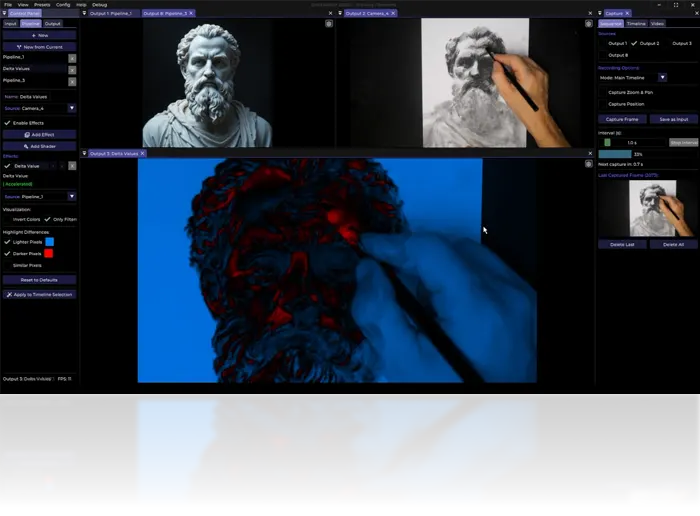
What is Art Software?
Art software encompasses digital tools for creating, editing, and processing visual media. This includes drawing and painting programs, animation software, video editors, 3D modeling tools, and specialized effects applications.
The right software depends on your medium, budget, and workflow. Many artists use multiple tools in combination: a drawing program for sketching, a painting program for color, and video software for final output.
Categories of Art Software
Raster Graphics
Pixel-based image editing and painting. Photoshop, GIMP, Krita, Affinity Photo. For photo editing, digital painting, and compositing.
Vector Graphics
Mathematical path-based drawing. Illustrator, Inkscape, Affinity Designer. For logos, icons, illustrations, and scalable graphics.
3D Modeling & Animation
Blender, Maya, Cinema 4D, ZBrush. For 3D characters, environments, product visualization, and animation.
Video Editing
Premiere Pro, DaVinci Resolve, Final Cut Pro. For assembling footage, color grading, and exporting final video.
Motion Graphics
After Effects, Fusion, Natron. For animated graphics, VFX, compositing, and motion design.
Specialized Tools
DeltaSketch (stop-motion/VFX), Procreate (iPad painting), Clip Studio (comics), Aseprite (pixel art). Purpose-built for specific workflows.
Popular Art Software Comparison
| Software | Type | Price | Platform | Best For |
|---|---|---|---|---|
| Photoshop | Raster | Subscription | Win/Mac | Industry standard, everything |
| Krita | Raster | Free | Win/Mac/Linux | Digital painting, concept art |
| GIMP | Raster | Free | Win/Mac/Linux | Photo editing, basic painting |
| Illustrator | Vector | Subscription | Win/Mac | Logos, icons, illustrations |
| Inkscape | Vector | Free | Win/Mac/Linux | Vector art, SVG editing |
| Blender | 3D | Free | Win/Mac/Linux | 3D modeling, animation, VFX |
| DaVinci Resolve | Video | Free/Studio | Win/Mac/Linux | Color grading, editing |
| After Effects | Motion | Subscription | Win/Mac | Motion graphics, VFX |
| Procreate | Raster | One-time | iPad | Digital painting, illustration |
| Clip Studio Paint | Raster | One-time/Sub | Win/Mac/iPad | Comics, manga, illustration |
Choosing the Right Software
For Beginners
Start with free software: Krita (painting), GIMP (photo editing), Blender (3D), or DaVinci Resolve (video). These are professional-grade tools with zero cost.
For Professionals
Industry standards: Photoshop (raster), Illustrator (vector), After Effects (motion), Premiere Pro (editing). Subscription models provide continuous updates and cloud integration.
For Specific Needs
Specialized tools often outperform generalist software: Procreate for iPad painting, Aseprite for pixel art, ZBrush for sculpting, DeltaSketch for stop-motion capture.
Workflow Integration
Most professional artists use multiple tools in a pipeline:
- Concept phase: Sketch in Krita or Photoshop
- Refinement: Paint in Photoshop or Procreate
- 3D integration: Model in Blender, texture in Substance
- Compositing: Assemble in After Effects or Nuke
- Color grading: DaVinci Resolve for final color
- Export: Encode with FFmpeg or Media Encoder
Learning how tools connect is as important as mastering individual software.
Hardware Considerations
Software performance depends on hardware:
- GPU: Critical for real-time effects, 3D viewport, video encoding
- RAM: 16GB minimum, 32GB+ for large projects
- Storage: SSDs for active projects, large HDDs for archives
- Display: Color-accurate monitor (sRGB/AdobeRGB coverage)
- Input: Graphics tablet or pen display for painting/drawing
Free vs. Paid Software
| Aspect | Free Software | Paid Software |
|---|---|---|
| Cost | $0 | $10–$60/month or one-time |
| Features | Often sufficient for most users | Advanced features, plugins, support |
| Learning curve | Similar to paid alternatives | Similar to free alternatives |
| Updates | Community-driven, variable | Regular, guaranteed |
| Support | Forums, documentation | Official support, tutorials |
| Industry adoption | Growing (Blender, Krita) | Still dominant (Adobe suite) |
Recommendation: Start with free software. Upgrade to paid tools only when you need specific features or workflow integration that free tools lack.
Getting Started
New artists can build a complete toolkit for free:
- Krita — Digital painting and drawing
- GIMP — Photo editing and compositing
- Blender — 3D modeling, animation, VFX
- DaVinci Resolve — Video editing and color grading
- Audacity — Audio editing
- FFmpeg — Video processing and encoding
- DeltaSketch — Stop-motion capture and real-time effects
This combination covers virtually every creative workflow with professional results.